DNS servers
The default servers are ready to use. Open Settings → DNS servers if you want to choose different providers or connection protocols. Select Apply settings after making changes; applying settings reconnects DNS if it is running.
Default servers
The following servers are configured by default. All use TLS encryption (DoT) with certificate verification and equal weight.
| Server | Server address | TLS certificate hostname |
|---|---|---|
| Cloudflare | 1.1.1.1:853 | cloudflare-dns.com |
| Quad9 | 9.9.9.9:853 | dns.quad9.net |
8.8.8.8:853 | dns.google |
New lookups are distributed among available servers. A failed request can be retried with another permitted server. The default settings do not fall back to unencrypted DNS.
Add or change a server
To add a server:
- Under DNS servers, select Add server.
- Enter its IP address and port in Server address.
- Choose the Transport. For DoT or DoH, enter the provider's TLS certificate hostname, which may differ from its IP address.
- Select Apply settings.
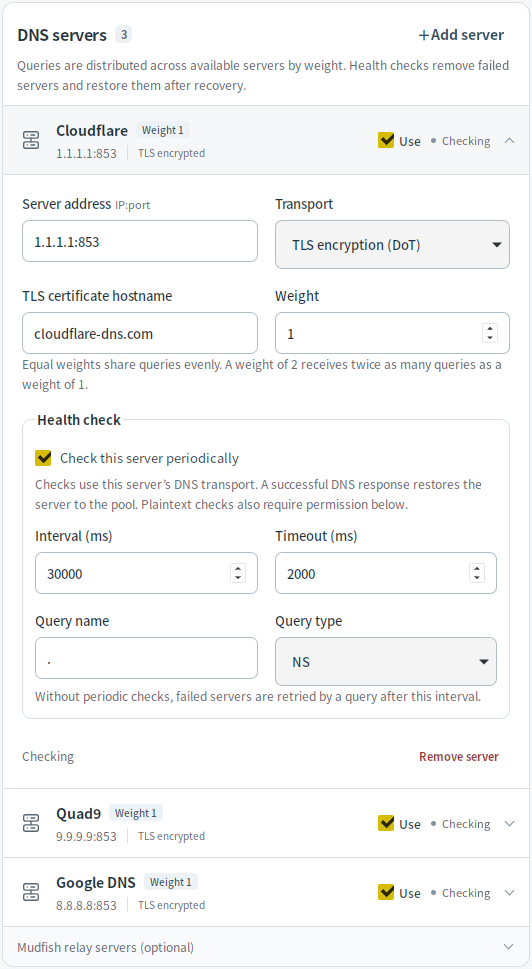
Up to 16 servers can be configured. Turn a server's Use switch off to keep its settings while excluding it from lookups, retries, and health checks. Keep at least one usable server enabled.
Transports and plaintext permissions
| Transport | When to use it |
|---|---|
| TLS encryption (DoT) | Encrypted DNS with server certificate verification, usually on port 853. This is the default. |
| HTTPS encryption (DoH) | Encrypted DNS with server certificate verification over HTTPS. Uses POST /dns-query, usually on port 443. |
| Mudfish UDP / Mudfish TCP | Compatibility with the original Mudfish DNS transport. Encrypts requests but does not authenticate the server. |
| Plaintext UDP / Plaintext TCP | Unencrypted DNS, available only for the uses you explicitly allow. |
For example, to use Cloudflare over DoH, set the address to 1.1.1.1:443 and
the certificate hostname to cloudflare-dns.com.
For plaintext servers, permission is separate for regular queries, fallback when other servers are unavailable, and health checks. Allowing one use does not allow the others. Plaintext DNS sent this session means unencrypted DNS has actually been sent since the current DNS session started, even if that request later failed.
Weights and health checks
Weight controls how often a server receives lookups that are not already cached. Equal weights share lookups evenly; a weight of 2 receives twice the share of a weight of 1 when both servers are available. Weights range from 1 to 100 and do not establish a primary/backup order.
Health checks are enabled by default, every 30 seconds with a 2-second timeout. Failed servers are temporarily removed from the available pool and return after a successful check. If you disable periodic checks, normal queries can retry that server after the configured interval.
The Start/Stop page warns when some servers are unreachable or no servers are available. DNS may still show as running while new lookups fail; check each server's status in Settings.
Mudfish relay servers
Expand Mudfish relay servers (optional) below the configured server list. Search for a region or server, choose Mudfish UDP or Mudfish TCP, and select Add selected server, then Apply settings. You can add more than one server. Refresh updates the available list without changing your saved configuration.
If no servers are available, follow the troubleshooting guide. To use a proxy, see SOCKS5 proxy settings.