Cache, history, and reset
Use these controls to refresh saved DNS answers, inspect recent activity, or restore the app's defaults. They are available on the Settings page.
Clear the DNS cache
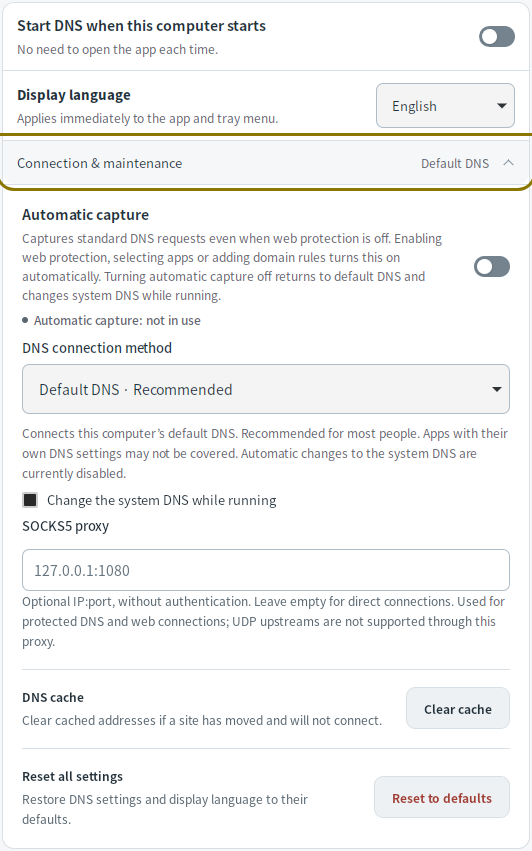
Mudfish caches DNS answers until their TTL expires. If a site's address has changed, use Settings → Connection & maintenance → Clear cache to request fresh answers on subsequent lookups. This clears Mudfish's cache; applications may also keep their own cached answers.
Recent domains
Recording is off by default. Enable Show recent domains and log web processing in Settings and apply it to see up to 32 recent entries on Start/Stop. These include DNS lookups and, on Windows/Linux with web protection enabled, web connections. DNS lookups can be shown with web protection off.
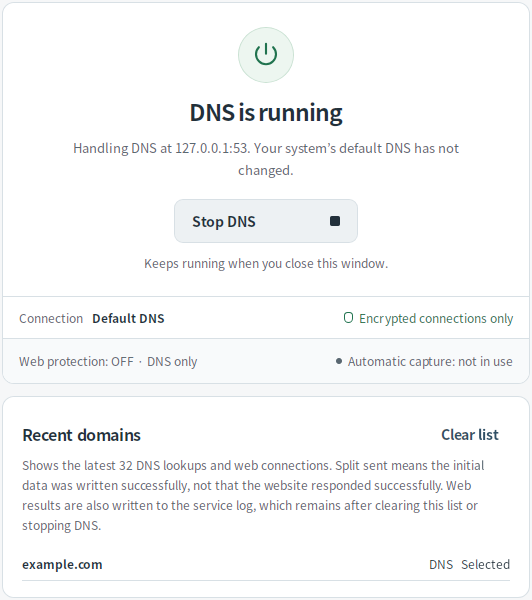
A lookup does not necessarily mean someone visited that website. For web connections, Split sent means the initial data was sent successfully; it does not confirm that the website responded successfully.
Clear list, stopping DNS, or applying settings clears the displayed history. On Windows and Linux, recorded web protection results also go to service logs. Clearing the list or stopping DNS does not delete those logs.
Reset settings
Use Settings → Connection & maintenance → Reset to defaults, then confirm Reset all settings. This resets saved settings and unsaved edits, including servers, app/domain rules, web protection, proxy, history, and automatic startup. The display language returns to the device's language.
If DNS is running, it restarts with the defaults and existing connections may close. If it is stopped, it stays stopped. Use Discard changes instead when you only want to undo unsaved edits.
To share diagnostics with support, use Report a problem.