Connection Protocols
When Mudfish program communicates with mudfish nodes, as default, UDP (Port 10008) is used.
If you're under the network firewall or the default doesn't work on your environment, you can try to change the connection protocols to others as follows:
-
TCP (Port 10008)
-
TCP (Port 443)
-
TCP (Port 1723)
-
TCP (Port 10006)
-
UDP (Port 10008)
-
UDP (Port 53)
-
UDP (Port 500)
-
UDP (Port 10006)
-
UDP (Port 10012) - FEC
This protocol is based on FEC algorithm. Its implmentation is little bit complex and unstable at edge cases but comparing with
UDP (Port 10023) - Simple FEC, it consumes less traffics.This mode is only available at PC/Desktop version. Support for this protocol was added in v4.5.3.
-
UDP (Port 10023) - Simple FEC
To avoid the packet loss at local ISP level, Mudfish will send 2 ~ 3 duplicate packets. It's very similar with FEC feature but it uses more traffics.
Its implementation is very strict and simple. So it's more stable than robust than
UDP (Port 10012) - FECprotocol.This mode is available at all platforms where Mudfish supports including mobile apps and PC/Desktop.
How to change
To change the connection protocol for Mudfish, please visit "Setup → Program" menu.
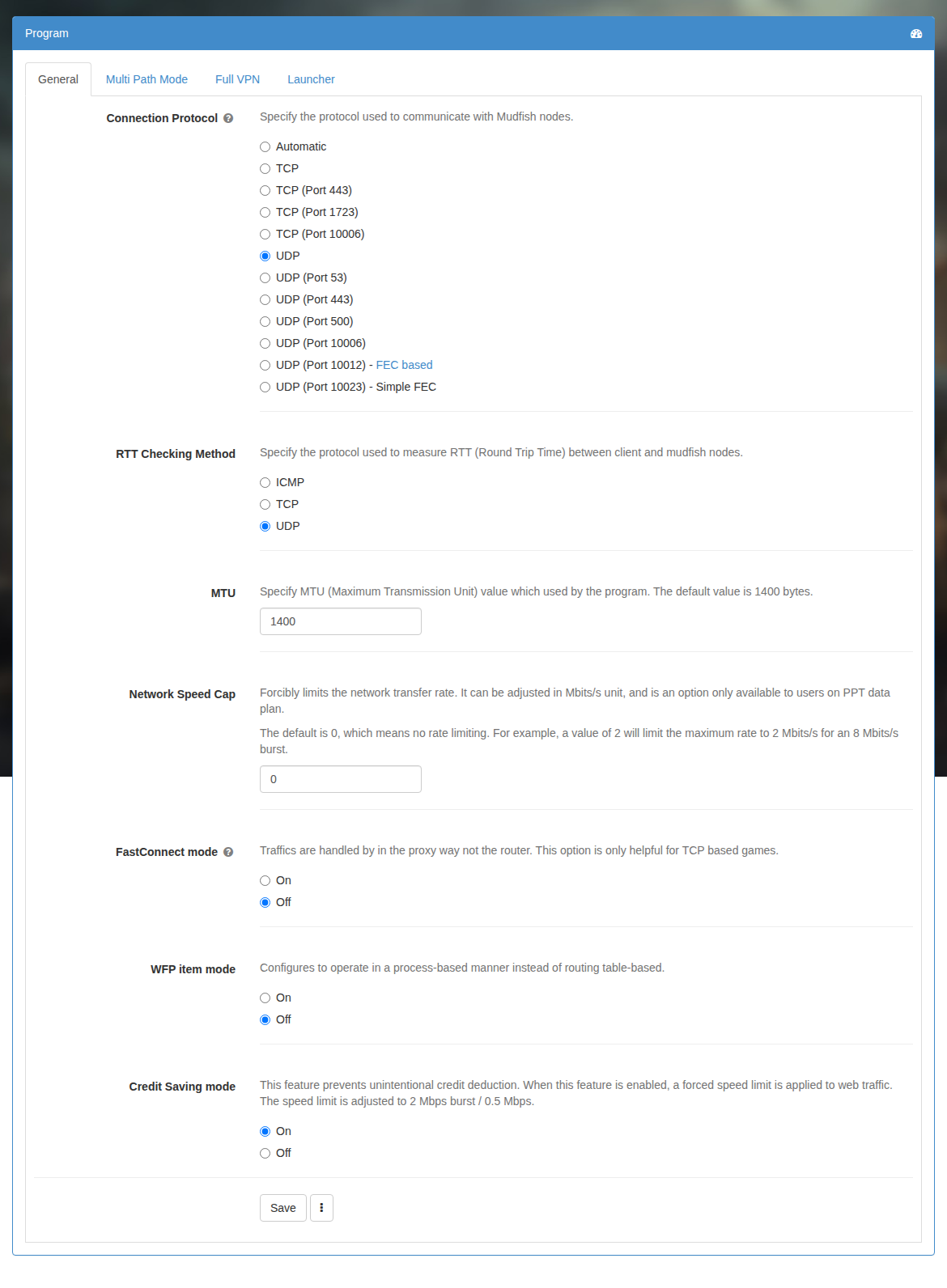
However, all list are available only if you enabled Expert Mode of your account.
With Expert Mode disabled, the available choices are TCP or UDP on port 10008, and UDP on port 10023.
The pros and cons
Due to the difference between TCP and UDP, which are Internet standard protocols, the Layer 4 protocol is completely different. This can be said that it inherits the advantages and disadvantages of each protocol. Here is the pros and cons of each protocol:
TCP
-
Advantages
- The chances of being filtered by a firewall are minimal.
- MTU (Maximum Transmission Unit) issues do not occur.
-
Disadvantages
-
The speed is slow compared to the UDP method. If a packet loss occurs in the middle mile, a ping spike or lag may occur in the process of recovering it.
For example, if a game client is a UDP-based game, the connection can be quite bad to perform unnecessary packet loss recovering.
-
UDP
-
Advantages
- Best way to process the packet. More faster and simple.
-
Disadvantages
- Due to firewall policy, the UDP protocol may be blocked in government offices / schools / company.
FAQ
Does changing the port affect game performance?
Normally, changing only the port does not affect performance. For example, UDP on port 53 and UDP on port 10008 should perform the same if both work correctly. Network QoS rules can make a difference if they assign different priorities to those ports.
Ports 10008 and 10006 are dedicated Mudfish data ports and may be blocked by network policies. Ports 53 and 443 are commonly allowed for DNS and HTTPS, so they may work where other ports are blocked, provided the node's IP address itself is not blocked. Port 10012 uses Forward Error Correction and can help on connections with packet loss.
TCP is better or UDP is better?
It depends on the game client. If the game client works based on TCP protocol (for example, WoW and FFXIV), both protocols make a same result. So no big differences.
However if the game client works based on UDP protocol (for example, WoT, Overwatch and LoL), definitely UDP connection protocol is better. If you uses TCP connection protocol for UDP-based game, it could make high ping or spikes.
TCP works but UDP doesn't work?
Sometimes TCP connection protocol works while UDP connection protocol doesn't work. For most of cases, this issue is caused by MTU (Maximum Transmission Unit) so you need to check MUDEC_00262 error links.
Also you should follow How to check the basic functionality instruction to make sure that mudfish works fine.