<?xml version="1.0" encoding="utf-8"?>
<feed xmlns="http://www.w3.org/2005/Atom">
    <id>https://docs.mudfish.net/v3/zh_Hant/blog</id>
    <title>Mudfish 文件 Blog</title>
    <updated>2025-09-23T00:00:00.000Z</updated>
    <generator>https://github.com/jpmonette/feed</generator>
    <link rel="alternate" href="https://docs.mudfish.net/v3/zh_Hant/blog"/>
    <subtitle>Mudfish 文件 Blog</subtitle>
    <icon>https://docs.mudfish.net/v3/zh_Hant/img/favicon.ico</icon>
    <entry>
        <title type="html"><![CDATA[使用 Web Inspect 解決 CDN / CLOUD 問題]]></title>
        <id>https://docs.mudfish.net/v3/zh_Hant/blog/2025/09/23/resolve-cdn-issues-with-web-inspect</id>
        <link href="https://docs.mudfish.net/v3/zh_Hant/blog/2025/09/23/resolve-cdn-issues-with-web-inspect"/>
        <updated>2025-09-23T00:00:00.000Z</updated>
        <summary type="html"><![CDATA[Mudfish v6.0.0 中新增了 Web Inspect 功能。我們簡單介紹一下該函數以及如何使用該函數解決CDN / CLOUD問題。]]></summary>
        <content type="html"><![CDATA[<p>Mudfish v6.0.0 中新增了 Web Inspect 功能。我們簡單介紹一下該函數以及如何使用該函數解決CDN / CLOUD問題。</p>
<h2 class="anchor anchorWithStickyNavbar_LWe7" id="web-inspect-기능-소개">Web Inspect功能介紹<a href="https://docs.mudfish.net/v3/zh_Hant/blog/2025/09/23/resolve-cdn-issues-with-web-inspect#web-inspect-%EA%B8%B0%EB%8A%A5-%EC%86%8C%EA%B0%9C" class="hash-link" aria-label="Web Inspect功能介紹的直接連結" title="Web Inspect功能介紹的直接連結">​</a></h2>
<div class="theme-admonition theme-admonition-note admonition_xJq3 alert alert--secondary"><div class="admonitionHeading_Gvgb"><span class="admonitionIcon_Rf37"><svg viewBox="0 0 14 16"><path fill-rule="evenodd" d="M6.3 5.69a.942.942 0 0 1-.28-.7c0-.28.09-.52.28-.7.19-.18.42-.28.7-.28.28 0 .52.09.7.28.18.19.28.42.28.7 0 .28-.09.52-.28.7a1 1 0 0 1-.7.3c-.28 0-.52-.11-.7-.3zM8 7.99c-.02-.25-.11-.48-.31-.69-.2-.19-.42-.3-.69-.31H6c-.27.02-.48.13-.69.31-.2.2-.3.44-.31.69h1v3c.02.27.11.5.31.69.2.2.42.31.69.31h1c.27 0 .48-.11.69-.31.2-.19.3-.42.31-.69H8V7.98v.01zM7 2.3c-3.14 0-5.7 2.54-5.7 5.68 0 3.14 2.56 5.7 5.7 5.7s5.7-2.55 5.7-5.7c0-3.15-2.56-5.69-5.7-5.69v.01zM7 .98c3.86 0 7 3.14 7 7s-3.14 7-7 7-7-3.12-7-7 3.14-7 7-7z"></path></svg></span>備註</div><div class="admonitionContent_BuS1"><p>由於作業系統的技術問題，該功能在 macOS 中無法正常運作。僅適用於 Linux / Windows。</p></div></div>
<p>對於Mudfish的某些項目（通常當遊戲伺服器使用Cloud服務時，例如Amazon AWS、Google Cloud、Microsoft Azure等），有可能遇到以下CDN / CLOUD問題。</p>
<ul>
<li><a href="http://wiki.mudfish.net/%EC%95%84%EB%A7%88%EC%A1%B4%20EC2%2C%20%ED%8A%B8%EC%9C%84%EC%B9%98%20%EA%B7%B8%EB%A6%AC%EA%B3%A0%20%EB%AF%B8%EA%BE%B8%EB%9D%BC%EC%A7%80" target="_blank" rel="noopener noreferrer">亞馬遜 EC2、Twitch 和 Mudfish</a></li>
<li><a href="http://wiki.mudfish.net/CDN%20%EA%B3%BC%20%EB%AF%B8%EA%BE%B8%EB%9D%BC%EC%A7%80" target="_blank" rel="noopener noreferrer">CDN 和 Mudfish</a></li>
</ul>
<p>Web Inspect功能就是為了解決這些問題而實現的。當該功能被啟動時，Mudfish 程式將如下運行。</p>
<ul>
<li>
<p>當使用者執行Mudfish程式並向Mudfish程式發送流量時，HTTP/HTTPS流量與流量分離。</p>
</li>
<li>
<p>在網路流量傳遞到Mudfish中繼伺服器之前，Mudfish程式本身會對流量執行Web Inspect，以確定流量是否與使用者配備的物品相關。</p>
</li>
<li>
<p>如果相關 Web 流量是與專案相關的流量，則 Mudfish 中繼伺服器會像先前一樣處理該流量。</p>
</li>
<li>
<p>如果所涉及的 Web 流量不是與專案相關的流量，則流量不會傳遞到 Mudfish 中繼伺服器，而是由用戶端本身作為 direct 進行處理。</p>
</li>
</ul>
<p>透過此功能，與使用者配備的物品無關的流量不會傳遞到Mudfish中繼伺服器，而是由客戶端自行處理為direct，解決了CDN / CLOUD問題。</p>
<h2 class="anchor anchorWithStickyNavbar_LWe7" id="web-inspect-기능-활성화-방법">如何啟用Web Inspect功能<a href="https://docs.mudfish.net/v3/zh_Hant/blog/2025/09/23/resolve-cdn-issues-with-web-inspect#web-inspect-%EA%B8%B0%EB%8A%A5-%ED%99%9C%EC%84%B1%ED%99%94-%EB%B0%A9%EB%B2%95" class="hash-link" aria-label="如何啟用Web Inspect功能的直接連結" title="如何啟用Web Inspect功能的直接連結">​</a></h2>
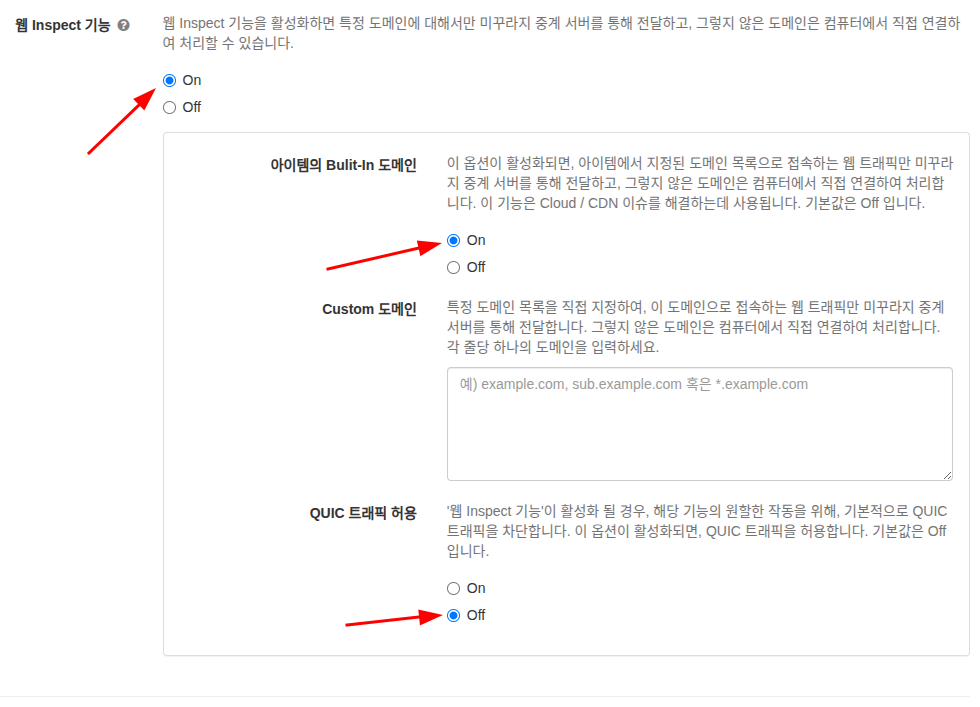
<p>Web Inspect 功能可在 Mudfish 程式的「設定 -&gt; 流量」畫面中啟動。詳細設定請參考<a href="https://docs.mudfish.net/v3/zh_Hant/docs/mudfish-product/mudfish-cloud-vpn/mudfish-launcher/setup/traffic">流量</a>文件。</p>
<p>CDN / Cloud 假設您使用有問題的物品（例如，Mabinogi 或 Nexon 相關物品），我建議的設定如下。</p>
<ul>
<li>在「流量」標籤中，將「Web Inspect 功能功能」複選框設定為 On。</li>
<li>將「專案的 Bulit-In 域」複選框設定為 On。</li>
<li>除非有特殊原因，「Custom 域」將保留為空。</li>
<li>「允許 QUIC 流量」設定為 Off。</li>
<li>儲存以套用您的設定。</li>
</ul>
<p><img decoding="async" loading="lazy" src="https://cdn.jsdelivr.net/gh/3rocks-github/mudfish-docs-images@main/a71896673bfd0073b9c354b2962222dc81cca20953ce5104f93879d29fd6f82c.png" alt="picture 0" class="img_ev3q"></p>]]></content>
        <author>
            <name>Weongyo Jeong</name>
            <email>weongyo@mudfish.net</email>
        </author>
    </entry>
    <entry>
        <title type="html"><![CDATA[在海外存取韓國串流服務]]></title>
        <id>https://docs.mudfish.net/v3/zh_Hant/blog/2023/11/19/access-korean-streaming-abroad</id>
        <link href="https://docs.mudfish.net/v3/zh_Hant/blog/2023/11/19/access-korean-streaming-abroad"/>
        <updated>2023-11-19T00:00:00.000Z</updated>
        <summary type="html"><![CDATA[Mudfish WebExtension（擴充功能）程式已更新為v4.6.6，且選單結構已更新，因此即使不處理PAC語法，也可以透過Mudfish輕鬆地僅傳遞所需的站點，如下所示。]]></summary>
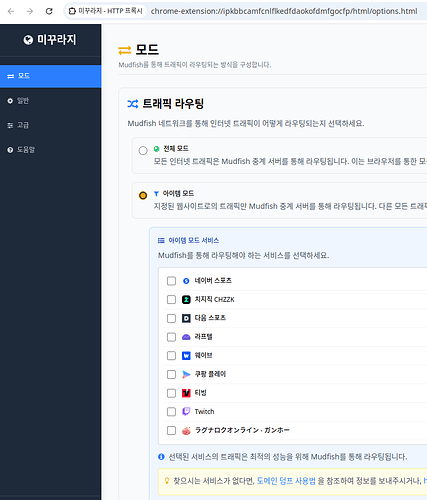
        <content type="html"><![CDATA[<div class="theme-admonition theme-admonition-info admonition_xJq3 alert alert--info"><div class="admonitionHeading_Gvgb"><span class="admonitionIcon_Rf37"><svg viewBox="0 0 14 16"><path fill-rule="evenodd" d="M7 2.3c3.14 0 5.7 2.56 5.7 5.7s-2.56 5.7-5.7 5.7A5.71 5.71 0 0 1 1.3 8c0-3.14 2.56-5.7 5.7-5.7zM7 1C3.14 1 0 4.14 0 8s3.14 7 7 7 7-3.14 7-7-3.14-7-7-7zm1 3H6v5h2V4zm0 6H6v2h2v-2z"></path></svg></span>說明</div><div class="admonitionContent_BuS1"><p>Mudfish WebExtension（擴充功能）程式已更新為v4.6.6，且選單結構已更新，因此即使不處理PAC語法，也可以透過Mudfish輕鬆地僅傳遞所需的站點，如下所示。</p><p><img decoding="async" loading="lazy" src="https://cdn.jsdelivr.net/gh/3rocks-github/mudfish-docs-images@main/f067abb26b1fecb22527c2ffe78122b351ad35aa8390d0d6e7943aa7a48c1bc0.png" alt="picture 0" class="img_ev3q"></p><p>請注意，您可以透過升級到最高擴充功能版本來使用它。可透過連結 <a href="https://mudfish.net/download" target="_blank" rel="noopener noreferrer">https://mudfish.net/download</a> 取得擴充下載。</p></div></div>
<p>當您居住在國外時，有時您想觀看韓國串流媒體，但由於訪問國家/地區的限製而常常無法觀看。然而，如果您只是使用VPN，則串流媒體經常會因頻寬限製而中斷。本技巧是一個腳本範例，使用 Mudfish 擴充的 PAC 語法函數輕鬆繞過它，而不會減慢速度。</p>
<p>在這個例子中，只有與國家限制相關的部分透過Mudfish傳輸，其餘的串流媒體連接到現有的網路線路。</p>
<h2 class="anchor anchorWithStickyNavbar_LWe7" id="스크립트">腳本<a href="https://docs.mudfish.net/v3/zh_Hant/blog/2023/11/19/access-korean-streaming-abroad#%EC%8A%A4%ED%81%AC%EB%A6%BD%ED%8A%B8" class="hash-link" aria-label="腳本的直接連結" title="腳本的直接連結">​</a></h2>
<div class="codeBlockContainer_Ckt0 theme-code-block" style="--prism-color:#393A34;--prism-background-color:#f6f8fa"><div class="codeBlockContent_biex"><pre tabindex="0" class="prism-code language-text codeBlock_bY9V thin-scrollbar" style="color:#393A34;background-color:#f6f8fa"><code class="codeBlockLines_e6Vv"><span class="token-line" style="color:#393A34"><span class="token plain">function FindProxyForURL(url, host) {</span><br></span><span class="token-line" style="color:#393A34"><span class="token plain">  host = host.toLowerCase();</span><br></span><span class="token-line" style="color:#393A34"><span class="token plain">  if (isPlainHostName(host) ||</span><br></span><span class="token-line" style="color:#393A34"><span class="token plain">      isInNetEx(host, "127.0.0.0/8") ||</span><br></span><span class="token-line" style="color:#393A34"><span class="token plain">      isInNetEx(host, "10.0.0.0/8") ||</span><br></span><span class="token-line" style="color:#393A34"><span class="token plain">      isInNetEx(host, "172.16.0.0/12") ||</span><br></span><span class="token-line" style="color:#393A34"><span class="token plain">      isInNetEx(host, "192.168.0.0/16") ||</span><br></span><span class="token-line" style="color:#393A34"><span class="token plain">      isInNetEx(host, "fc00::/7") ||</span><br></span><span class="token-line" style="color:#393A34"><span class="token plain">      isInNetEx(host, "fe80::/10") ||</span><br></span><span class="token-line" style="color:#393A34"><span class="token plain">      host == "mudfish.net") {</span><br></span><span class="token-line" style="color:#393A34"><span class="token plain">        return "DIRECT";</span><br></span><span class="token-line" style="color:#393A34"><span class="token plain">  }</span><br></span><span class="token-line" style="color:#393A34"><span class="token plain" style="display:inline-block"></span><br></span><span class="token-line" style="color:#393A34"><span class="token plain">  if (host == "apis.naver.com" ||</span><br></span><span class="token-line" style="color:#393A34"><span class="token plain">      host == "api-gw.sports.naver.com" ||</span><br></span><span class="token-line" style="color:#393A34"><span class="token plain">      host == "api.chzzk.naver.com" ||</span><br></span><span class="token-line" style="color:#393A34"><span class="token plain">      host == "api.laftel.net" ||</span><br></span><span class="token-line" style="color:#393A34"><span class="token plain">      host == "api.tving.com" ||</span><br></span><span class="token-line" style="color:#393A34"><span class="token plain">      host == "apis.wavve.com" ||</span><br></span><span class="token-line" style="color:#393A34"><span class="token plain">      host == "bill.tving.com" ||</span><br></span><span class="token-line" style="color:#393A34"><span class="token plain">      host == "comm-api.game.naver.com" ||</span><br></span><span class="token-line" style="color:#393A34"><span class="token plain">      host == "gw.tving.com" ||</span><br></span><span class="token-line" style="color:#393A34"><span class="token plain">      host == "kakaotv.daum.net" ||</span><br></span><span class="token-line" style="color:#393A34"><span class="token plain">      host == "laftel.net" ||</span><br></span><span class="token-line" style="color:#393A34"><span class="token plain">      host == "tv.kakao.com" ||</span><br></span><span class="token-line" style="color:#393A34"><span class="token plain">      host == "tv.naver.com" ||</span><br></span><span class="token-line" style="color:#393A34"><span class="token plain">      host == "user.tving.com" ||</span><br></span><span class="token-line" style="color:#393A34"><span class="token plain">      host == "usher.ttvnw.net" ||</span><br></span><span class="token-line" style="color:#393A34"><span class="token plain">      host == "watcha.com" ||</span><br></span><span class="token-line" style="color:#393A34"><span class="token plain">      host == "www.coupangplay.com" ||</span><br></span><span class="token-line" style="color:#393A34"><span class="token plain">      host == "www.tving.com" ||</span><br></span><span class="token-line" style="color:#393A34"><span class="token plain">      host == "myip.mudfish.net") {</span><br></span><span class="token-line" style="color:#393A34"><span class="token plain">      return "{0}";</span><br></span><span class="token-line" style="color:#393A34"><span class="token plain">  }</span><br></span><span class="token-line" style="color:#393A34"><span class="token plain">  return "DIRECT";</span><br></span><span class="token-line" style="color:#393A34"><span class="token plain">}</span><br></span></code></pre><div class="buttonGroup__atx"><button type="button" aria-label="複製程式碼至剪貼簿" title="複製" class="clean-btn"><span class="copyButtonIcons_eSgA" aria-hidden="true"><svg viewBox="0 0 24 24" class="copyButtonIcon_y97N"><path fill="currentColor" d="M19,21H8V7H19M19,5H8A2,2 0 0,0 6,7V21A2,2 0 0,0 8,23H19A2,2 0 0,0 21,21V7A2,2 0 0,0 19,5M16,1H4A2,2 0 0,0 2,3V17H4V3H16V1Z"></path></svg><svg viewBox="0 0 24 24" class="copyButtonSuccessIcon_LjdS"><path fill="currentColor" d="M21,7L9,19L3.5,13.5L4.91,12.09L9,16.17L19.59,5.59L21,7Z"></path></svg></span></button></div></div></div>
<p>上述語法是透過Mudfish僅傳輸特定網域，並透過現有網路線路傳輸所有其他網域的腳本。上述腳本具有針對下列站點的串流旁路功能。</p>
<ul>
<li>NAVER Sports</li>
<li>NAVER CHZZK</li>
<li>Daum Sports</li>
<li>Laftel</li>
<li>wavve</li>
<li>Coupang Play</li>
<li>TVING</li>
<li>Twitch 1080p</li>
</ul>
<h2 class="anchor anchorWithStickyNavbar_LWe7" id="세팅-방법">設定方法<a href="https://docs.mudfish.net/v3/zh_Hant/blog/2023/11/19/access-korean-streaming-abroad#%EC%84%B8%ED%8C%85-%EB%B0%A9%EB%B2%95" class="hash-link" aria-label="設定方法的直接連結" title="設定方法的直接連結">​</a></h2>
<p>這很簡單。</p>
<ol>
<li>
<p>安裝 Mudfish 瀏覽器擴充功能。您可以在 <a href="https://mudfish.net/download" target="_blank" rel="noopener noreferrer">https://mudfish.net/download</a> 找到它。</p>
</li>
<li>
<p>安裝完成後，進入Mudfish擴充設定功能，進入左側Advanced選單，找到PAC項目。</p>
</li>
<li>
<p>以上腳本為Copy&amp;Paste和Apply。並關閉設定畫面。</p>
</li>
<li>
<p>並連接Mudfish瀏覽器擴充功能。對於韓語串流媒體，您必須選擇韓國 Mudfish 中繼伺服器。</p>
</li>
</ol>]]></content>
        <author>
            <name>Weongyo Jeong</name>
            <email>weongyo@mudfish.net</email>
        </author>
    </entry>
    <entry>
        <title type="html"><![CDATA[查看瀏覽器擴充功能記錄]]></title>
        <id>https://docs.mudfish.net/v3/zh_Hant/blog/2023/10/23/inspect-browser-extension-logs</id>
        <link href="https://docs.mudfish.net/v3/zh_Hant/blog/2023/10/23/inspect-browser-extension-logs"/>
        <updated>2023-10-23T00:00:00.000Z</updated>
        <summary type="html"><![CDATA[使用Mudfish瀏覽器擴充功能時，有時可能會出現原因不明、出現意外問題的情況，需要管理員的協助。]]></summary>
        <content type="html"><![CDATA[<p>使用Mudfish瀏覽器擴充功能時，有時可能會出現原因不明、出現意外問題的情況，需要管理員的協助。</p>
<p>在這種情況下，為了獲得有效的幫助，顯示擴充日誌對於縮小問題範圍非常有幫助。在本文中，我們將解釋如何存取瀏覽器擴充日誌。</p>
<h2 class="anchor anchorWithStickyNavbar_LWe7" id="console-창-여는-방법">如何開啟Console窗口<a href="https://docs.mudfish.net/v3/zh_Hant/blog/2023/10/23/inspect-browser-extension-logs#console-%EC%B0%BD-%EC%97%AC%EB%8A%94-%EB%B0%A9%EB%B2%95" class="hash-link" aria-label="如何開啟Console窗口的直接連結" title="如何開啟Console窗口的直接連結">​</a></h2>
<ul>
<li>
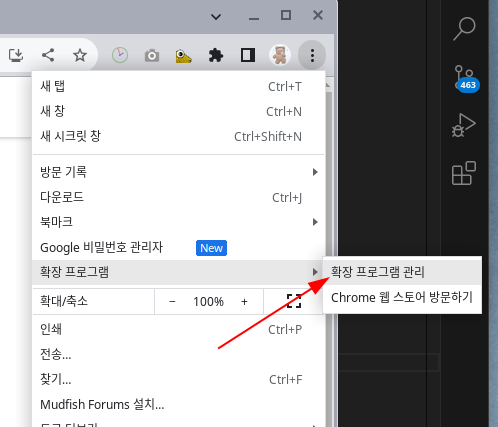
<p>開啟擴充管理頁面。</p>
<p><img decoding="async" loading="lazy" src="https://cdn.jsdelivr.net/gh/3rocks-github/mudfish-docs-images@main/2283e63e8bc0a69de21365fa65583469bd4ed86d16d119e8f3636a5e435a335c.png" alt="picture 0" class="img_ev3q"></p>
</li>
<li>
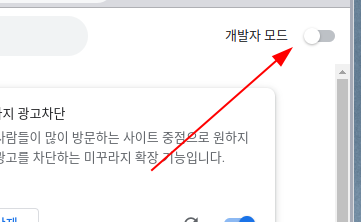
<p>然後，當擴充頁面開啟時，啟用右上角的開發人員模式。</p>
<p><img decoding="async" loading="lazy" src="https://cdn.jsdelivr.net/gh/3rocks-github/mudfish-docs-images@main/dfa6a4e27f01ad62dbe628da77ddb5d2353724743ae288a171046f3f6779b2b3.png" alt="picture 1" class="img_ev3q"></p>
</li>
<li>
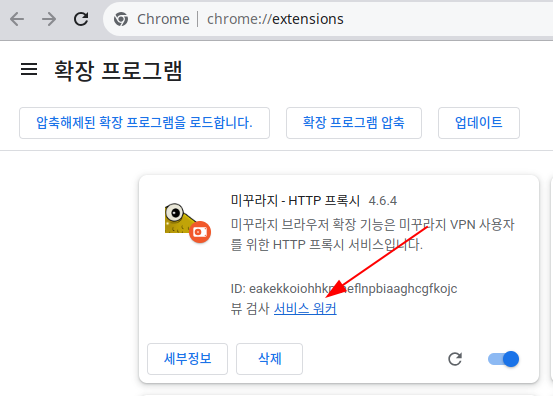
<p>您將在螢幕上看到「Mudfish - HTTP 代理」。然後點擊那裡的「Service Worker」。</p>
<p><img decoding="async" loading="lazy" src="https://cdn.jsdelivr.net/gh/3rocks-github/mudfish-docs-images@main/9fb614232e213992b1e75b19f6ce0d671ee0724141ed58e22d6cb815b17ab5d4.png" alt="picture 2" class="img_ev3q"></p>
</li>
<li>
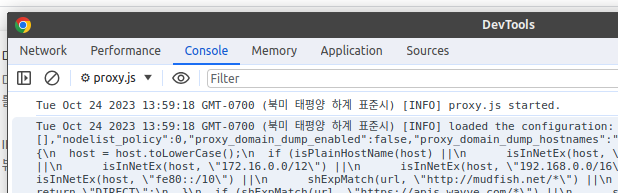
<p>這將開啟一個新的 DevTools 視窗。如果您在那裡打開“Console”窗口，您將看到瀏覽器擴充功能的日誌。</p>
<div class="theme-admonition theme-admonition-warning admonition_xJq3 alert alert--warning"><div class="admonitionHeading_Gvgb"><span class="admonitionIcon_Rf37"><svg viewBox="0 0 16 16"><path fill-rule="evenodd" d="M8.893 1.5c-.183-.31-.52-.5-.887-.5s-.703.19-.886.5L.138 13.499a.98.98 0 0 0 0 1.001c.193.31.53.501.886.501h13.964c.367 0 .704-.19.877-.5a1.03 1.03 0 0 0 .01-1.002L8.893 1.5zm.133 11.497H6.987v-2.003h2.039v2.003zm0-3.004H6.987V5.987h2.039v4.006z"></path></svg></span>注意</div><div class="admonitionContent_BuS1"><p>切勿將此 DevTools 視窗截圖並與他人分享或將整個內容共用為 Copy&amp;Paste。由於此畫面是偵錯訊息，因此會暴露敏感的使用者密碼資訊。</p></div></div>
<p><img decoding="async" loading="lazy" src="https://cdn.jsdelivr.net/gh/3rocks-github/mudfish-docs-images@main/82125e3d8b737ac58c771914dda2bebaa179050f636f5e894d7c2b894b8e2eef.png" alt="picture 3" class="img_ev3q"></p>
</li>
</ul>
<h2 class="anchor anchorWithStickyNavbar_LWe7" id="브라우저-확장-기능-로그에서-살펴봐야-할-항목">在瀏覽器擴充日誌中尋找什麼<a href="https://docs.mudfish.net/v3/zh_Hant/blog/2023/10/23/inspect-browser-extension-logs#%EB%B8%8C%EB%9D%BC%EC%9A%B0%EC%A0%80-%ED%99%95%EC%9E%A5-%EA%B8%B0%EB%8A%A5-%EB%A1%9C%EA%B7%B8%EC%97%90%EC%84%9C-%EC%82%B4%ED%8E%B4%EB%B4%90%EC%95%BC-%ED%95%A0-%ED%95%AD%EB%AA%A9" class="hash-link" aria-label="在瀏覽器擴充日誌中尋找什麼的直接連結" title="在瀏覽器擴充日誌中尋找什麼的直接連結">​</a></h2>
<ul>
<li>Console 視窗中是否有與 WARN / ERROR 對應的訊息？</li>
<li><code>pac_script</code>相關零件設定是否正確？</li>
</ul>]]></content>
        <author>
            <name>Weongyo Jeong</name>
            <email>weongyo@mudfish.net</email>
        </author>
    </entry>
    <entry>
        <title type="html"><![CDATA[中繼伺服器清單篩選的常見誤用]]></title>
        <id>https://docs.mudfish.net/v3/zh_Hant/blog/2020/11/02/node-list-filter-pitfalls</id>
        <link href="https://docs.mudfish.net/v3/zh_Hant/blog/2020/11/02/node-list-filter-pitfalls"/>
        <updated>2020-11-02T00:00:00.000Z</updated>
        <summary type="html"><![CDATA[當您使用Mudfish程式時，您會看到「設定→中繼伺服器」選單，但有時人們會混淆它。在以下情況下，]]></summary>
        <content type="html"><![CDATA[<p>當您使用Mudfish程式時，您會看到「設定→中繼伺服器」選單，但有時人們會混淆它。在以下情況下，</p>
<ul>
<li>居住在韓國的用戶A玩「戰車世界」遊戲，想要連接Europe（Germany）的遊戲伺服器。</li>
<li>因此，我在「設定 → 中繼伺服器」選單中選擇了 DE Europe（Germany - Lightsail）中繼伺服器並繼續。</li>
</ul>
<p>在這種情況下，您不應從中繼伺服器清單限制中選擇要使用的中繼伺服器，而應從您正在使用的「坦克世界」項目設定選單中選擇有問題的中繼伺服器。</p>
<h2 class="anchor anchorWithStickyNavbar_LWe7" id="중계-서버-목록-제한-기능은무엇인가요">什麼是中繼伺服器清單限制功能？<a href="https://docs.mudfish.net/v3/zh_Hant/blog/2020/11/02/node-list-filter-pitfalls#%EC%A4%91%EA%B3%84-%EC%84%9C%EB%B2%84-%EB%AA%A9%EB%A1%9D-%EC%A0%9C%ED%95%9C-%EA%B8%B0%EB%8A%A5%EC%9D%80%EB%AC%B4%EC%97%87%EC%9D%B8%EA%B0%80%EC%9A%94" class="hash-link" aria-label="什麼是中繼伺服器清單限制功能？的直接連結" title="什麼是中繼伺服器清單限制功能？的直接連結">​</a></h2>
<p>最初創建此功能的原因是隨著Mudfish中繼伺服器數量的逐漸增加。隨著螢幕上顯示的中繼伺服器數量的增加，使用者開始請求此功能。</p>
<ul>
<li>
<p>用戶A：我住在韓國，主要玩日本遊戲。因此，除了 KR 和 JP 節點之外，我沒有任何用處。我不能讓這些節點不可見嗎？</p>
</li>
<li>
<p>用戶B：我主要從韓國連接美國西部的遊戲伺服器。但是，在特定中繼伺服器的情況下，它被遊戲伺服器阻止，因此我不想在推薦路線中看到該中繼伺服器。</p>
</li>
</ul>
<h2 class="anchor anchorWithStickyNavbar_LWe7" id="해당-기능을-설정하면-무엇이달라지나요">如果我打開該功能會發生什麼變化？<a href="https://docs.mudfish.net/v3/zh_Hant/blog/2020/11/02/node-list-filter-pitfalls#%ED%95%B4%EB%8B%B9-%EA%B8%B0%EB%8A%A5%EC%9D%84-%EC%84%A4%EC%A0%95%ED%95%98%EB%A9%B4-%EB%AC%B4%EC%97%87%EC%9D%B4%EB%8B%AC%EB%9D%BC%EC%A7%80%EB%82%98%EC%9A%94" class="hash-link" aria-label="如果我打開該功能會發生什麼變化？的直接連結" title="如果我打開該功能會發生什麼變化？的直接連結">​</a></h2>
<p>當您設定中繼伺服器清單限制功能時，以下是在使用者檢視中變更的區域。</p>
<ul>
<li>
<p>「狀態→中繼伺服器」選單中只會顯示所需的中繼伺服器清單。</p>
</li>
<li>
<p>裝備項目的「項目設定」選單中的中繼伺服器清單也會改變。</p>
</li>
<li>
<p>「設定→程式→Full VPN 模式」中的中繼伺服器清單也會變更。</p>
</li>
<li>
<p>中繼伺服器清單限制反映在每個項目的「今日推薦路線」的結果中。</p>
</li>
</ul>]]></content>
        <author>
            <name>Weongyo Jeong</name>
            <email>weongyo@mudfish.net</email>
        </author>
    </entry>
    <entry>
        <title type="html"><![CDATA[修改網路卡的 Metric 值]]></title>
        <id>https://docs.mudfish.net/v3/zh_Hant/blog/2020/10/19/change-nic-metric</id>
        <link href="https://docs.mudfish.net/v3/zh_Hant/blog/2020/10/19/change-nic-metric"/>
        <updated>2020-10-19T00:00:00.000Z</updated>
        <summary type="html"><![CDATA[有些人說，即使他們打開了Full VPN模式來檢查基本操作，Mudfish也無法正常工作。]]></summary>
        <content type="html"><![CDATA[<p>有些人說，即使他們打開了Full VPN模式來檢查基本操作，Mudfish也無法正常工作。</p>
<p>當您收到因此問題導致的問題報告時，有時網路設備會因為 Metric 問題而無法正常運作。在本文中，我們將說明 Windows 使用者如何變更 NIC (Network Interface Card) 的 Metric。</p>
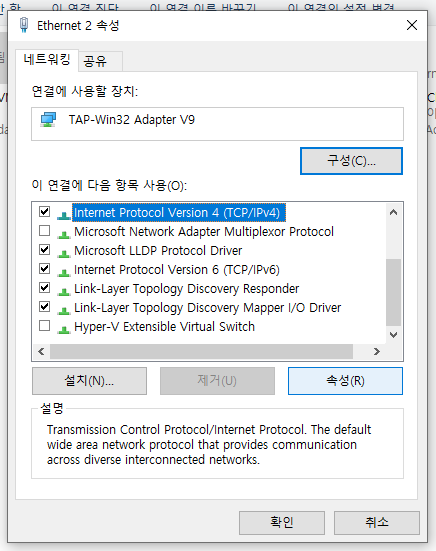
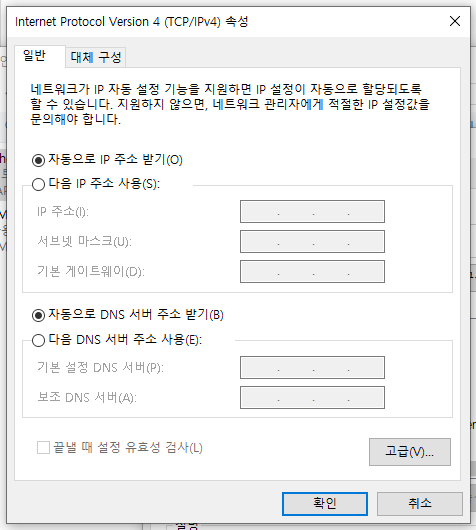
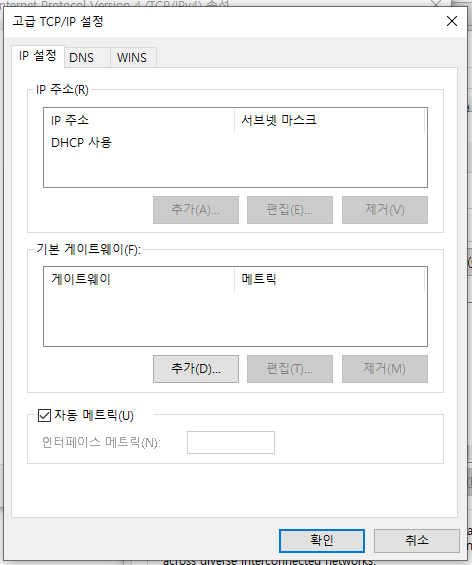
<p>首先要做的是進入TAP-Win32 adapter v9網路設備的設定畫面。只需按照下面的螢幕截圖進行操作即可。</p>
<ul>
<li>
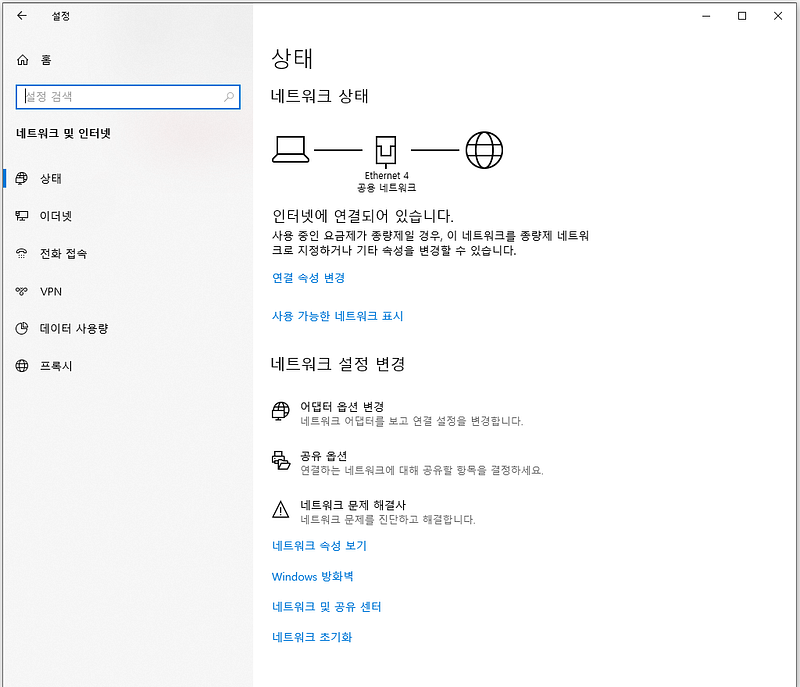
<p>控制面板 → 網路和 Internet → 變更適配器選項</p>
<p><img decoding="async" loading="lazy" src="https://cdn.jsdelivr.net/gh/3rocks-github/mudfish-docs-images@main/a452720e555a973aca2f2ef9a3b6af44617c48864274afcb71c711685be1779e.png" alt="控制台 → 網路和 Internet → 更改適配器選項" class="img_ev3q"></p>
</li>
<li>
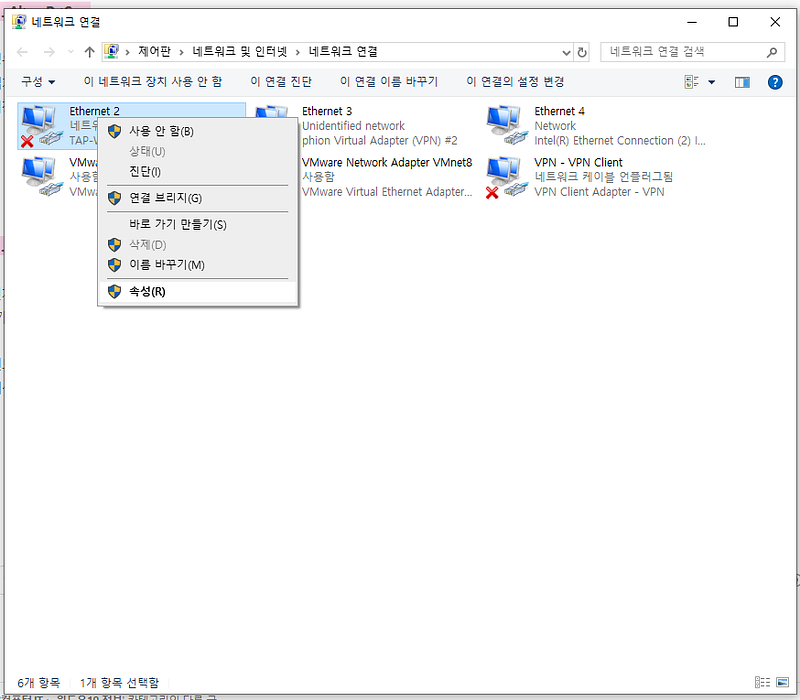
<p>找到 TAP-Win32 adapter v9 裝置後的「屬性」螢幕</p>
<p><img decoding="async" loading="lazy" src="https://cdn.jsdelivr.net/gh/3rocks-github/mudfish-docs-images@main/daee72143e9f1e567b44ad037bebb8a2f6e0d0a9236917ca95a9c5238f43d4a2.png" alt="picture 1" class="img_ev3q"></p>
</li>
<li>
<p>Internet Protocol Version 4的「屬性」螢幕</p>
<p><img decoding="async" loading="lazy" src="https://cdn.jsdelivr.net/gh/3rocks-github/mudfish-docs-images@main/5a6963c1a3ac4aba8322374898ba32a64cdc2ab71ea22a716c1c994a9663a9bd.png" alt="picture 2" class="img_ev3q"></p>
</li>
<li>
<p>點選“進階（V）”按鈕</p>
<p><img decoding="async" loading="lazy" src="https://cdn.jsdelivr.net/gh/3rocks-github/mudfish-docs-images@main/b8255ad6d89b112d7b7e62d2f488986a1f5d5a8dc259266656ddf8df40101234.png" alt="picture 3" class="img_ev3q"></p>
</li>
<li>
<p>關閉「自動指標」(Off)</p>
<p><img decoding="async" loading="lazy" src="https://cdn.jsdelivr.net/gh/3rocks-github/mudfish-docs-images@main/ce3d42e3f8f967ced5c543bf82a03a62fc26ac8afd8499268af1f483bad51bfe.png" alt="picture 4" class="img_ev3q"></p>
</li>
</ul>
<hr>
<p>如果您按照此處操作，您將看到“自動指標”部分。關閉 Checkbox 至 Off 後，在「介面指標 (N)」部分輸入所需的值。</p>
<h2 class="anchor anchorWithStickyNavbar_LWe7" id="q-어떤-값을-넣어야하나요">Q. 我該輸入什麼值？<a href="https://docs.mudfish.net/v3/zh_Hant/blog/2020/10/19/change-nic-metric#q-%EC%96%B4%EB%96%A4-%EF%BF%BD%EA%B0%92%EC%9D%84-%EB%84%A3%EC%96%B4%EC%95%BC%ED%95%98%EB%82%98%EC%9A%94" class="hash-link" aria-label="Q. 我該輸入什麼值？的直接連結" title="Q. 我該輸入什麼值？的直接連結">​</a></h2>
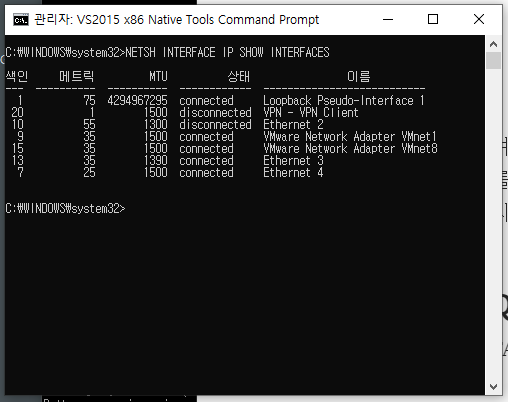
<p>對於裝置 TAP-Win32 adapter v9，Metric 的適當值如下：</p>
<ul>
<li>
<p>大於 Internet 電纜所連接的 NIC 設備或 WIFI 設備的 Metric 值的值。</p>
</li>
<li>
<p>大於在命令提示字元下執行 NETSH INTERFACE IP SHOW INTERFACES 命令時顯示的「度量」值的值就足夠了。例如，如果出現下列值，則適當的度量值將大於 55。</p>
</li>
</ul>
<p><img decoding="async" loading="lazy" src="https://cdn.jsdelivr.net/gh/3rocks-github/mudfish-docs-images@main/1cadf8bef1406b4e5015d3c41d50ee5a571fa86df34a02224966494a05bf1cdb.png" alt="picture 5" class="img_ev3q"></p>]]></content>
        <author>
            <name>Weongyo Jeong</name>
            <email>weongyo@mudfish.net</email>
        </author>
    </entry>
    <entry>
        <title type="html"><![CDATA[無需安裝 Mudfish 即可估算 Ping]]></title>
        <id>https://docs.mudfish.net/v3/zh_Hant/blog/2020/10/18/estimate-ping-without-mudfish</id>
        <link href="https://docs.mudfish.net/v3/zh_Hant/blog/2020/10/18/estimate-ping-without-mudfish"/>
        <updated>2020-10-18T00:00:00.000Z</updated>
        <summary type="html"><![CDATA[當我透過Mudfish論壇（https://forums.mudfish.net）提供技術支援時，我收到了數量驚人的人提出的這個問題。]]></summary>
        <content type="html"><![CDATA[<p>當我透過Mudfish論壇（<a href="https://forums.mudfish.net/" target="_blank" rel="noopener noreferrer">https://forums.mudfish.net</a>）提供技術支援時，我收到了數量驚人的人提出的這個問題。</p>
<blockquote>
<p>如果我使用 Mudfish 程序，我的 ping 值真的會下降嗎？如果跌的話，跌多少？</p>
</blockquote>
<p>從提供技術支援的角度來看，這個問題並不容易回答。原因有很多，但最主要的原因是：</p>
<ul>
<li>
<p>我不知道提問者的電腦和大約500的Mudfish中繼伺服器之間的RTT（Round Trip Time）。</p>
</li>
<li>
<p>沒有內部服務可以簡單地計算預期 ping。</p>
</li>
</ul>
<p>結果很多回應都說「安裝Mudfish自己測試一下」。從提供技術支援的角度來看，這很容易做到，但從使用者的角度來看，尤其是那些剛接觸Mudfish程式的人來說，這是非常不友善的指導。</p>
<hr>
<p>所以我們實施了它。 :-) 您無需安裝程式即可輕鬆找到所需遊戲伺服器的預期 ping。詳細使用說明請參考下面的YouTube影片。</p>
<iframe width="560" height="315" src="https://www.youtube.com/embed/Tjn-3pzz6Pw" title="YouTube video player" frameborder="0" allow="accelerometer; autoplay; clipboard-write; encrypted-media; gyroscope; picture-in-picture"></iframe>]]></content>
        <author>
            <name>Weongyo Jeong</name>
            <email>weongyo@mudfish.net</email>
        </author>
    </entry>
    <entry>
        <title type="html"><![CDATA[Mudfish v4.6.0 更新內容]]></title>
        <id>https://docs.mudfish.net/v3/zh_Hant/blog/2019/07/09/mudfish-v4.6.0-changes</id>
        <link href="https://docs.mudfish.net/v3/zh_Hant/blog/2019/07/09/mudfish-v4.6.0-changes"/>
        <updated>2019-07-09T00:00:00.000Z</updated>
        <summary type="html"><![CDATA[就新發布的 Mudfish v4.6.0 而言，有些部分可能會讓現有用戶感到困惑，因此我們想在單獨的部落格上更詳細地介紹這些變化。]]></summary>
        <content type="html"><![CDATA[<p>就新發布的 Mudfish v4.6.0 而言，有些部分可能會讓現有用戶感到困惑，因此我們想在單獨的部落格上更詳細地介紹這些變化。</p>
<h2 class="anchor anchorWithStickyNavbar_LWe7" id="연결하기-버튼이-생겼어요">有一個“連接”按鈕。<a href="https://docs.mudfish.net/v3/zh_Hant/blog/2019/07/09/mudfish-v4.6.0-changes#%EC%97%B0%EA%B2%B0%ED%95%98%EA%B8%B0-%EB%B2%84%ED%8A%BC%EC%9D%B4-%EC%83%9D%EA%B2%BC%EC%96%B4%EC%9A%94" class="hash-link" aria-label="有一個“連接”按鈕。的直接連結" title="有一個“連接”按鈕。的直接連結">​</a></h2>
<p>對於 workflow 在 Mudfish v4.6.0 之前的情況，要執行 Mudfish，請執行下列操作：</p>
<ol>
<li>
<p>從開始功能表以管理員身份執行 Mudfish Launcher。</p>
</li>
<li>
<p>登入</p>
</li>
<li>
<p>等待设置配置完成</p>
</li>
<li>
<p>運行遊戲</p>
</li>
</ol>
<p>然而，從 v4.6.0 開始，workflow 發生瞭如下變化。</p>
<ol>
<li>
<p>從開始功能表以管理員身份執行 Mudfish Launcher。</p>
</li>
<li>
<p>登入</p>
</li>
<li>
<p>點選“連接”按鈕。</p>
</li>
<li>
<p>等待设置配置完成</p>
</li>
<li>
<p>運行遊戲</p>
</li>
</ol>
<p>結果多了一步，但這提高了 UX 與其他平台的 Mudfish 程式的一致性。另外，與「自動登入」功能搭配使用時，將省去繁瑣的VPN on/off流程，減少步驟，使用起來更加方便。</p>
<h2 class="anchor anchorWithStickyNavbar_LWe7" id="공개-무료-서버-탭이-생겼습니다">現在有一個“公共免費伺服器”選項卡。<a href="https://docs.mudfish.net/v3/zh_Hant/blog/2019/07/09/mudfish-v4.6.0-changes#%EA%B3%B5%EA%B0%9C-%EB%AC%B4%EB%A3%8C-%EC%84%9C%EB%B2%84-%ED%83%AD%EC%9D%B4-%EC%83%9D%EA%B2%BC%EC%8A%B5%EB%8B%88%EB%8B%A4" class="hash-link" aria-label="現在有一個“公共免費伺服器”選項卡。的直接連結" title="現在有一個“公共免費伺服器”選項卡。的直接連結">​</a></h2>
<p>新增了約 <strong>400 至 600 台</strong> 「公共免費伺服器」。用戶可選擇的中繼伺服器數量顯著增加。以前只能使用Mudfish Networks提供的中繼伺服器，但現在v4.6.0版本支援OpenVPN client，可以使用網路上提供的免費伺服器。</p>
<p>因為是免費伺服器，</p>
<ul>
<li>不需要單獨的 Mudfish 點數，</li>
<li>無速度限制</li>
</ul>
<p>它是可用的。</p>
<blockquote>
<p>但是，請務必記住，由於 Mudfish Networks 不運營免費伺服器，因此我們對由此可能發生的任何連接丟失/穩定性等不承擔任何責任。</p>
</blockquote>
<p>「公共免費伺服器」標籤可以在「設定 -&gt; 程式 -&gt; Full VPN」中找到。請注意，我們計劃透過未來的版本更新在遊戲物品設定中啟用此功能。</p>]]></content>
        <author>
            <name>Weongyo Jeong</name>
            <email>weongyo@mudfish.net</email>
        </author>
    </entry>
    <entry>
        <title type="html"><![CDATA[WFP 驅動程式介紹]]></title>
        <id>https://docs.mudfish.net/v3/zh_Hant/blog/2019/04/01/introducing-wfp-driver</id>
        <link href="https://docs.mudfish.net/v3/zh_Hant/blog/2019/04/01/introducing-wfp-driver"/>
        <updated>2019-04-01T00:00:00.000Z</updated>
        <summary type="html"><![CDATA[在本文檔中，我們將介紹 Mudfish v4.5.1 中新加入的 WFP (Windows Filtering Platform) 驅動程式。本文不是技術解釋，而是以問答的形式構建，說明為何包含此功能以及在何處使用它。]]></summary>
        <content type="html"><![CDATA[<p>在本文檔中，我們將介紹 Mudfish v4.5.1 中新加入的 WFP (Windows Filtering Platform) 驅動程式。本文不是技術解釋，而是以問答的形式構建，說明為何包含此功能以及在何處使用它。</p>
<blockquote>
<p>如果以下文档中有任何不正确或难以理解的内容，请联系<a href="https://forums.mudfish.net/" target="_blank" rel="noopener noreferrer">Mudfish论坛</a>。</p>
</blockquote>
<h2 class="anchor anchorWithStickyNavbar_LWe7" id="wfp-드라이버가-무슨-일을-하죠">WFP 驅動程式有什麼作用？<a href="https://docs.mudfish.net/v3/zh_Hant/blog/2019/04/01/introducing-wfp-driver#wfp-%EB%93%9C%EB%9D%BC%EC%9D%B4%EB%B2%84%EA%B0%80-%EB%AC%B4%EC%8A%A8-%EC%9D%BC%EC%9D%84-%ED%95%98%EC%A3%A0" class="hash-link" aria-label="WFP 驅動程式有什麼作用？的直接連結" title="WFP 驅動程式有什麼作用？的直接連結">​</a></h2>
<p>在創建新的 WFP 驅動程式之前，Mudfish 不僅可以 <strong>正確</strong> 處理遊戲流量。一個代表性的例子是下面的文件相關部分。</p>
<ul>
<li><a href="http://wiki.mudfish.net/%EC%95%84%EB%A7%88%EC%A1%B4%20EC2%2C%20%ED%8A%B8%EC%9C%84%EC%B9%98%20%EA%B7%B8%EB%A6%AC%EA%B3%A0%20%EB%AF%B8%EA%BE%B8%EB%9D%BC%EC%A7%80" target="_blank" rel="noopener noreferrer">亞馬遜 EC2、Twitch 和 Mudfish</a></li>
<li><a href="http://wiki.mudfish.net/CDN%20%EA%B3%BC%20%EB%AF%B8%EA%BE%B8%EB%9D%BC%EC%A7%80" target="_blank" rel="noopener noreferrer">CDN 和 Mudfish</a></li>
</ul>
<p>這導致了幾個問題：</p>
<ul>
<li>
<p>透過 Mudfish 的未經請求的流量有時可能會導致嚴重的點數流失。</p>
</li>
<li>
<p>當遊戲伺服器位置發生變化時，沒有正確處理，因此有一個創建遊戲資料包轉儲並將其發送給 Mudfish 運營商以更新項目的過程。</p>
</li>
</ul>
<p>Mudfish WFP 過濾驅動程式就是為了解決這個問題而創建的。也就是說，使用這個驅動程式</p>
<ul>
<li>
<p>只有指定進程產生的流量才能通過Mudfish。例如，在玩 Overwatch 的同時觀看 Twitch 將不再導致錯誤的點數使用。</p>
</li>
<li>
<p>它可以應用於新的遊戲目的地，而無需單獨的資料包轉儲。</p>
</li>
<li>
<p>Mudfish不支援的遊戲也可以輕鬆套用。</p>
</li>
</ul>
<h2 class="anchor anchorWithStickyNavbar_LWe7" id="어떤-운영체제를-지원하죠">你們支援哪些作業系統？<a href="https://docs.mudfish.net/v3/zh_Hant/blog/2019/04/01/introducing-wfp-driver#%EC%96%B4%EB%96%A4-%EC%9A%B4%EF%BF%BD%EF%BF%BD%EC%98%81%EC%B2%B4%EC%A0%9C%EB%A5%BC-%EC%A7%80%EC%9B%90%ED%95%98%EC%A3%A0" class="hash-link" aria-label="你們支援哪些作業系統？的直接連結" title="你們支援哪些作業系統？的直接連結">​</a></h2>
<p>WFP 驅動程式支援以下作業系統：</p>
<ul>
<li>Windows XP（不工作）</li>
<li>Windows Vista SP2（不工作）</li>
<li>Windows 7（不工作）</li>
<li>Windows 8（工作）</li>
<li>Windows 8.1（工作）</li>
<li>Windows 10（工作）</li>
</ul>
<p>不支援 Linux 和 Mac OS X。</p>
<h2 class="anchor anchorWithStickyNavbar_LWe7" id="어떻게-쓰는-거죠">你怎麼寫呢？<a href="https://docs.mudfish.net/v3/zh_Hant/blog/2019/04/01/introducing-wfp-driver#%EC%96%B4%EB%96%BB%EA%B2%8C-%EC%93%B0%EB%8A%94-%EA%B1%B0%EC%A3%A0" class="hash-link" aria-label="你怎麼寫呢？的直接連結" title="你怎麼寫呢？的直接連結">​</a></h2>
<p>不需要任何特殊設定。只需使用Mudfish v4.5.1或更高版本即可自動套用和使用。</p>
<p>如果您想要<a href="https://docs.mudfish.net/v3/zh_Hant/docs/mudfish-product/mudfish-cloud-vpn/mudfish-launcher/item/#custom-%EC%95%84%EC%9D%B4%ED%85%9C-%EC%A0%9C%EC%9E%91">製程Custom物品</a>，請參閱說明以了解更多詳情。</p>]]></content>
        <author>
            <name>Weongyo Jeong</name>
            <email>weongyo@mudfish.net</email>
        </author>
    </entry>
    <entry>
        <title type="html"><![CDATA[透過 SSL 連線存取網站]]></title>
        <id>https://docs.mudfish.net/v3/zh_Hant/blog/2019/02/19/webextensions-secure-connection</id>
        <link href="https://docs.mudfish.net/v3/zh_Hant/blog/2019/02/19/webextensions-secure-connection"/>
        <updated>2019-02-19T00:00:00.000Z</updated>
        <summary type="html"><![CDATA[在本文中，我們將說明如何使用 Mudfish 瀏覽器擴充功能的 Secure Connection 選項造訪該網站。]]></summary>
        <content type="html"><![CDATA[<p>在本文中，我們將說明如何使用 Mudfish 瀏覽器擴充功能的 Secure Connection 選項造訪該網站。</p>
<blockquote>
<p>如果以下文档中有任何不正确或难以理解的内容，请联系<a href="https://forums.mudfish.net/" target="_blank" rel="noopener noreferrer">Mudfish论坛</a>。</p>
</blockquote>
<h2 class="anchor anchorWithStickyNavbar_LWe7" id="왜-secure-connection-이-필요하죠">為什麼需要 Secure Connection？<a href="https://docs.mudfish.net/v3/zh_Hant/blog/2019/02/19/webextensions-secure-connection#%EC%99%9C-secure-connection-%EC%9D%B4-%ED%95%84%EC%9A%94%ED%95%98%EC%A3%A0" class="hash-link" aria-label="為什麼需要 Secure Connection？的直接連結" title="為什麼需要 Secure Connection？的直接連結">​</a></h2>
<p>這很簡單。對於某些網站，會被warning.or.kr屏蔽，目前DNS/HTTP（Request監控）/HTTPS（SNI監控）都被監控。避免這種情況的唯一方法是對通訊本身進行加密。</p>
<h2 class="anchor anchorWithStickyNavbar_LWe7" id="secure-connection-옵션-활성화">啟動 Secure Connection 選項<a href="https://docs.mudfish.net/v3/zh_Hant/blog/2019/02/19/webextensions-secure-connection#secure-connection-%EC%98%B5%EC%85%98-%ED%99%9C%EC%84%B1%ED%99%94" class="hash-link" aria-label="啟動 Secure Connection 選項的直接連結" title="啟動 Secure Connection 選項的直接連結">​</a></h2>
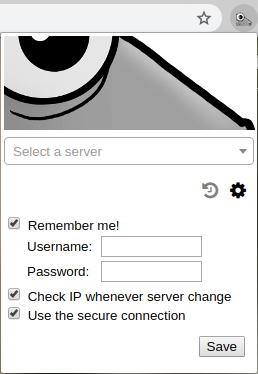
<p>如果您安裝了Mudfish瀏覽器擴充程序，您可以看到Mudfish圖示和選單，如下所示。</p>
<p>您可以按如下方式啟動此選項：</p>
<center><p><img decoding="async" loading="lazy" src="https://docs.mudfish.net/v3/zh_Hant/assets/images/20190219_141049_5531Z_4-55ea514fe926f6e01c4872c5e7255ce6.png" width="258" height="374" class="img_ev3q"></p></center>
<ul>
<li>
<p><span class="fa fa-cog"></span> 點選齒輪圖示。</p>
</li>
<li>
<p>勾選“Use the secure connection”選項並儲存。</p>
</li>
</ul>
<p>從現在起，與 Mudfish 中繼伺服器的通訊將不會被防火牆阻止，因為它使用 SSL 加密通訊。</p>]]></content>
        <author>
            <name>Weongyo Jeong</name>
            <email>weongyo@mudfish.net</email>
        </author>
    </entry>
</feed>